

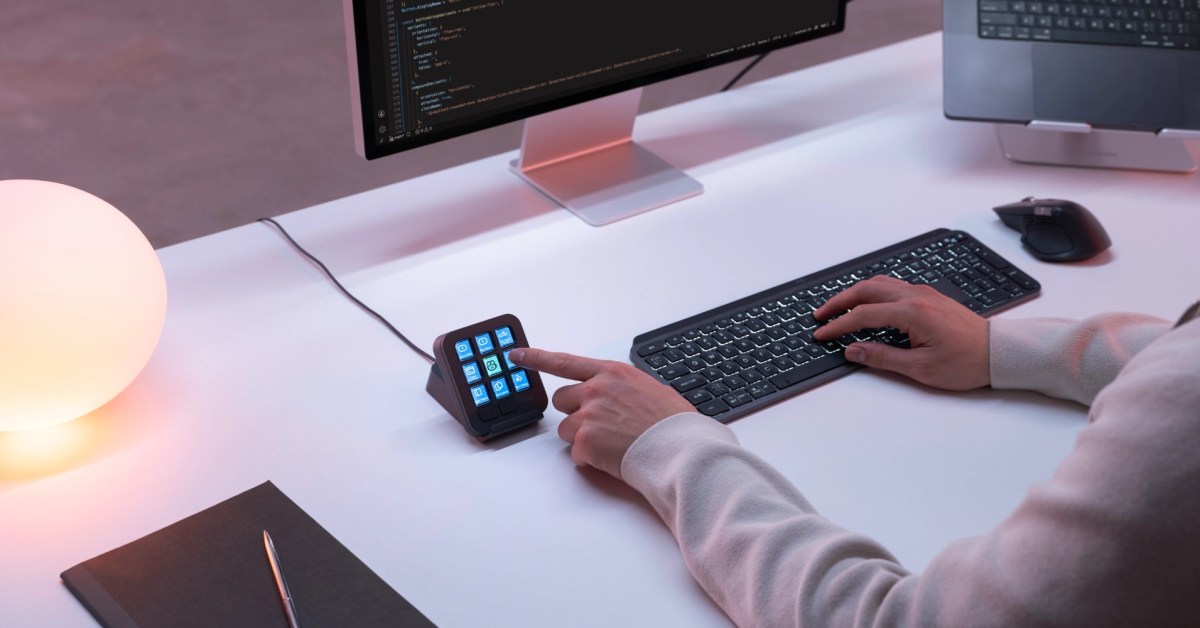
Logitech has announced the MX Keypad, a $99.99 desktop accessory designed for people who want physical, programmable controls for coding, automation, and AI-assisted work. The compact keypad has nine full-color LCD keys that can display labels, icons, and changing status information. While it can be used with almost any app, Logitech is pitching the product specifically at developers and AI enthusiasts, a group that increasingly relies on macros, prompts, and repeated commands.
MX Keypad at a glance
The MX Keypad is a small, dedicated control surface rather than a full keyboard. It measures about 3.6 by 3.1 inches and weighs only 96 grams, making it easy to place alongside a laptop, a desktop keyboard, or an existing Logitech MX setup. It connects through USB-C and is compatible with macOS 13 or later and Windows 10 or later.
Each of the nine keys can be assigned a specific function through Logitech’s Logi Options+ software. Because the keys are full-color LCD screens, the visual label on a key can change whenever the function changes. This makes it possible to have one key show a play icon while an AI agent is running, then switch to a stop icon when the user wants to interrupt the process. The LCD element is important because a static label would make it far harder to manage dynamic functions.
A more affordable alternative to MX Creative Console
Logitech earlier introduced the MX Creative Console, a product that paired an LCD keypad with a separate controller that included a dial and other controls. That bundle was aimed at photo, video, audio, and other creative professionals. It carried a list price of $199.99.
The MX Keypad is essentially the keypad half of the MX Creative Console, without the separate dial controller, and at half the price. The original pitch for the Creative Console was centered on creative apps, while the new MX Keypad is focused on coding and AI workflows. Because the lower-cost unit uses the same keypad concept, it should feel familiar to anyone who has tried the Creative Console without requiring them to pay for hardware they may not need.
Why physical controls matter for coding and AI workflows
For years, mechanical keyboard enthusiasts and power users have used macro pads to assign keyboard shortcuts to physical keys. The MX Keypad takes that idea further by allowing the meaning of the buttons to change based on the active application, and by giving each button a digital display that can keep the user informed.
AI coding assistants create a new reason to consider dedicated hardware. Developers often move between an editor, a terminal, a chat window, and a browser to run an AI agent, check logs, review generated code, and adjust prompts. Instead of reaching for the mouse and hunting through menus, a developer could use a set of physical keys to insert a saved prompt, tell the assistant to continue, or run a script that tests the generated code.
The product also comes at a time when agentic programming is beginning to attract attention. Agents are systems that do more than suggest code; they can autonomously edit files, run commands, and interact with other tools. Supporting that kind of work means having reliable ways to trigger, monitor, and stop long-running tasks. The MX Keypad is designed to fit into those workflows through a combination of customizable keys, page switching, and optional plugins.
Customizing the experience with Logi Options+
Logi Options+ is the software hub for the MX Keypad. Users can assign shortcuts, saved prompts, scripts, and macros to any of the nine main keys. Two dedicated page buttons are built into the hardware, and Logitech says users can access up to 15 pages of controls. That can turn the small device into a much larger command center.
The software also supports app-aware profiles. When a user moves from one application to another, the keypad can automatically load a layout tied to that application. For instance, the same row of keys can be set up to run formatting commands in VS Code, send reactions in Slack, and open frequently used sites in Chrome. The ability to switch layouts without opening the software makes the keypad useful across a range of tasks.
Logi Options+ also provides access to the Logi Marketplace, where users can download plugins, profiles, and icon packs. A built-in icon editor lets users create their own labels and icons. For people who do not want to design graphics from scratch, the Marketplace can reduce the work needed to build a personalized keypad.
Programming the keypad with AI
One of the more interesting details in Logitech’s announcement is that the MX Keypad can be programmed by an AI coding agent. In Logitech’s example, Codex was used to control a Mac through computer use and program custom buttons in Logi Options+ based on how a person interacts with ChatGPT on the Mac. The process is a neat demonstration of how the product fits into the AI world: an agent can both use software and configure hardware to make future agentic workflows more efficient.
This also highlights a broader trend. Instead of expecting users to memorize dozens of shortcuts, developers can ask an AI to observe their habits and then create custom controls for the actions they repeat most often. Since every key on the MX Keypad can be re-programmed through software, the same hardware can adapt to a changing workflow without replacing the physical device.
GitHub and Copilot integration
Logitech says it developed the MX Keypad in collaboration with GitHub. The companies have built GitHub Copilot integration into VS Code, which means users can control certain Copilot actions from the keypad rather than relying only on the editor interface. The product also includes three free months of GitHub Copilot Pro+ for both new and existing users. The offer is redeemable through Logi Options+, so users do not need to leave the Logitech setup process to activate it.
Deep integration with developer tools is an important selling point. A generic macro pad can send keystrokes, but it cannot easily show the status of a coding agent or provide buttons that change while a task is in progress. Collaborating with GitHub suggests the MX Keypad is designed to work in that deeper way with at least one major AI coding platform.
Plugin support for Claude Code and OpenAI Codex
Logitech also plans to use community plugins for Claude Code and OpenAI Codex. Those plugins can provide specialized functions such as agent status tracking and terminal controls. Exactly how each plugin works will likely vary, but the goal is to let users push a physical button to start or stop an agent, view whether an agent is idle, or issue commands without returning to the terminal.
Developers who want more control can build custom plugins with the Logi Actions SDK. The SDK supports C and Node.js, two widely used languages in the developer community. This opens the door to integrations that go beyond official profiles and marketplace downloads. A developer team could build internal controls that map to their own deployment pipelines, testing commands, or AI tools.
Availability and system requirements
The MX Keypad is available starting on September 8 in two colors: Graphite and Pale Grey. The list price is $99.99. It connects to a computer through USB-C and requires macOS 13 or later, or Windows 10 or later. The build does not require batteries because it is a wired device, and its relatively small footprint means it can fit in a bag alongside a keyboard or a laptop.
The launch of the MX Keypad gives Logitech a more accessible entry point into the programming-hardware market. With the MX Creative Console, Logitech sold a premium bundle that included a dial and a keypad. By removing the dial and dropping the price to $99.99, the company is now trying to reach a broader audience that may not need the full creative control surface but still wants dedicated keys for code and AI tasks.
Physical controls could become a more common part of the AI-powered development experience as assistants gain the ability to act on behalf of users. The MX Keypad is an attempt to make those controls feel personal, visible, and adaptable. It brings the configurability of a high-end stream deck into the Logitech MX ecosystem and wraps it in software that tries to connect the physical keys to some of the most popular coding and AI tools on the market.
Source: 9to5Mac News